
Skip to content

Mini-Map: Embedding Floor Plan Previews in Your App

A mini-map is a floor plan preview embedded directly in your content, for example on an exhibitor detail screen. Tapping it expands to a full interactive map where users can explore the floor plan, zoom, and get wayfinding directions to a booth.

Full working examples are available on GitHub:

The Pattern

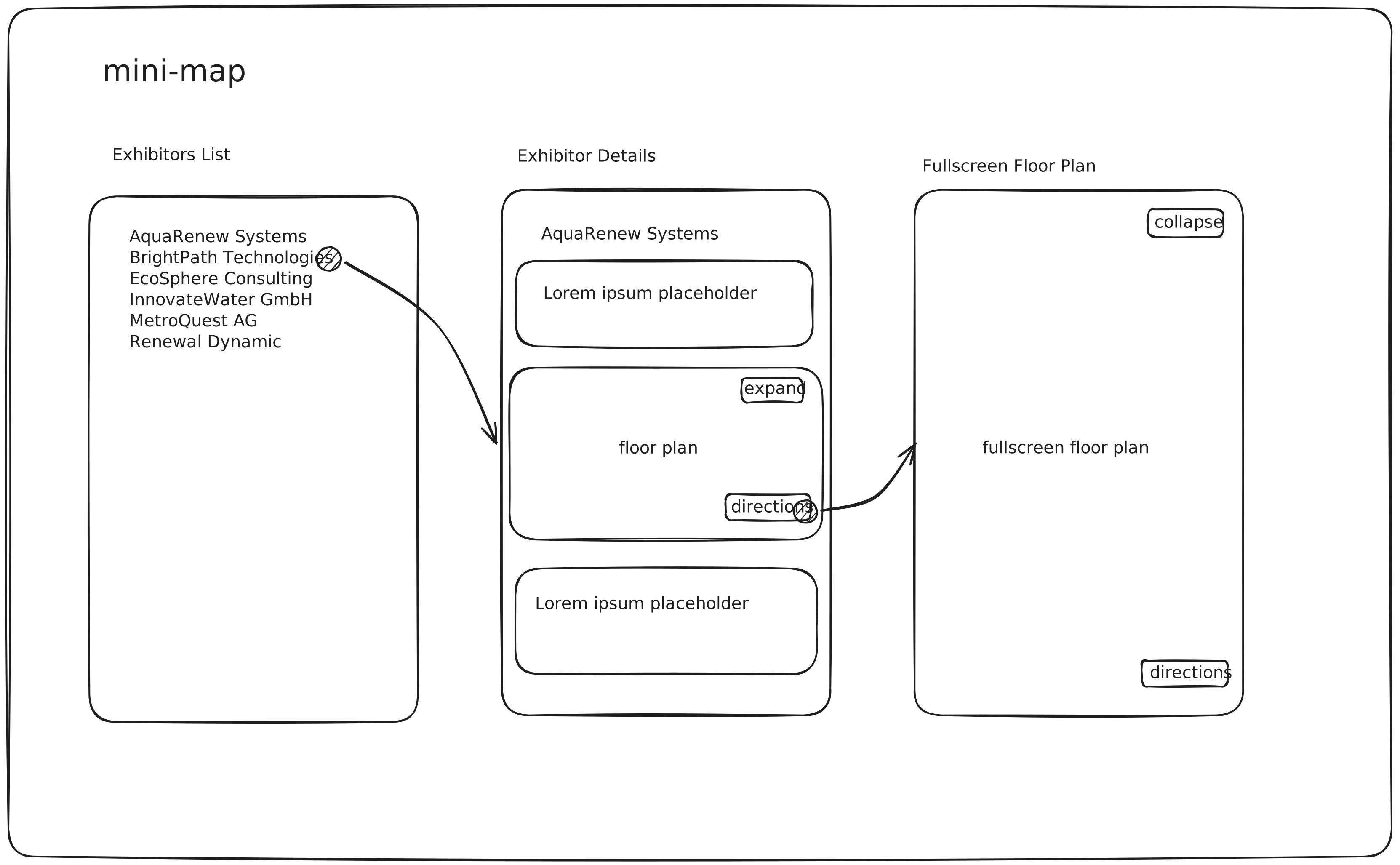
Mini-map wireframe

Both example apps follow a three-screen flow:

  1. Exhibitors List — loads exhibitors from the SDK and renders them as a scrollable list.
  2. Exhibitor Detail — shows a mini-map preview of the selected booth with Expand and Directions buttons.
  3. Fullscreen Plan — the mini-map expands into a full interactive plan with Collapse and Directions controls.

The core SDK APIs shared across platforms:

APIPurpose
setElementsVisibilityHide default SDK chrome for a clean embedded look
selectExhibitorHighlight a booth by name or ID
selectRouteDraw a wayfinding path between two booths
fitBoundsReset zoom to show the full plan

iOS (SwiftUI)

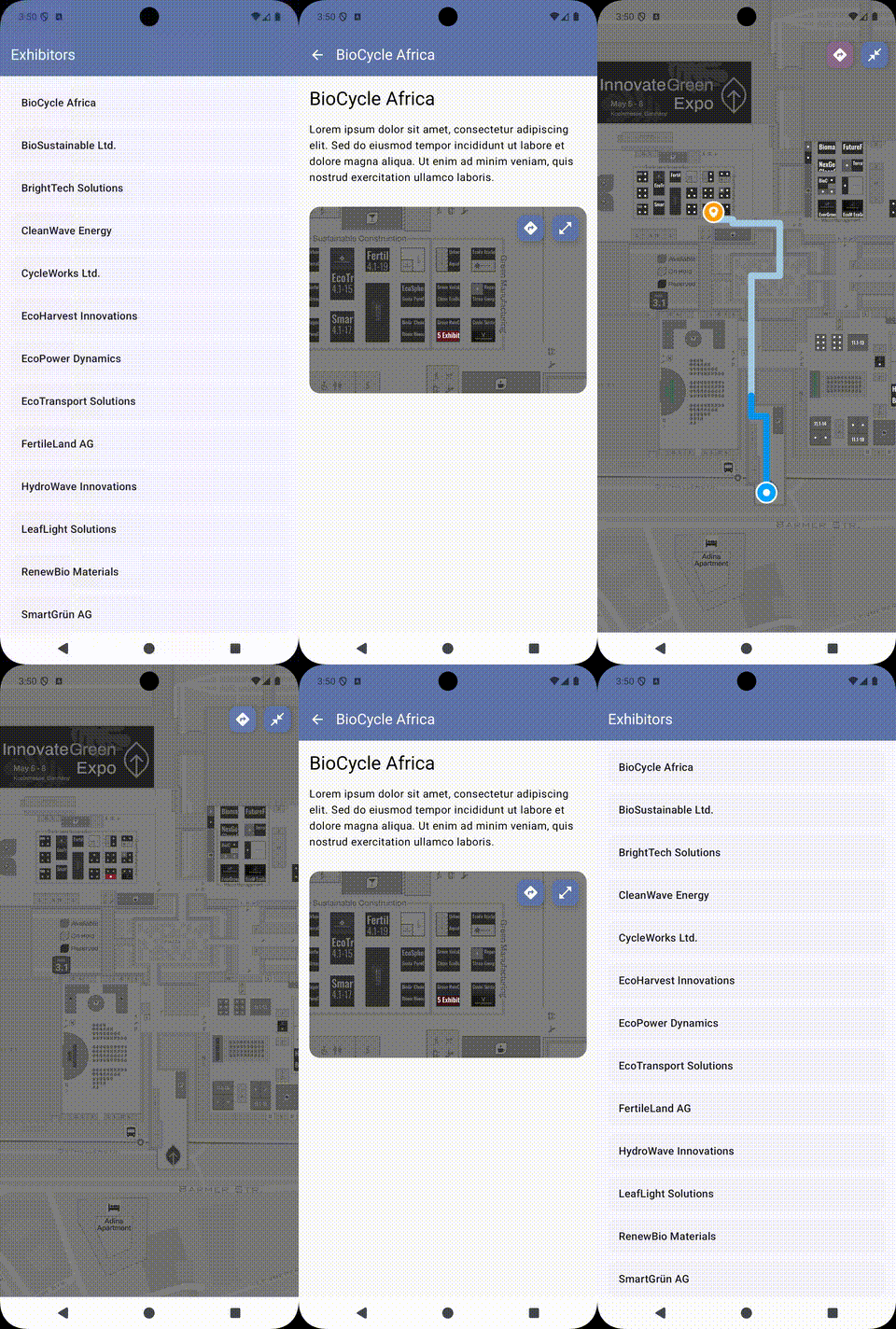
Demo

Quick Start

bash
git clone https://github.com/expofp/expofp-sdk-ios-examples.git
cd expofp-sdk-ios-examples/MiniMap
open MiniMap.xcodeproj

Build and run on a simulator or device (Xcode 16+, iOS 17+).

Architecture

  • Two PlanPresenter instancesminiMap for the inline preview, map for the fullscreen view. Both share the same expo key but operate independently.
  • matchedGeometryEffect — SwiftUI animates the transition between inline and fullscreen by matching geometry via a shared Namespace.
  • allowsHitTesting(false) — the inline preview ignores all touch input so it acts as a static thumbnail.

Key Code

Two-presenter pattern (ContentStore.swift):

swift
@MainActor
final class ContentStore: ObservableObject {
    let miniMap = ExpoFpPlan.createPlanPresenter(with: .expoKey("demo"))
    let map = ExpoFpPlan.createPlanPresenter(with: .expoKey("demo"))
}

Plan ready → hide chrome → load exhibitors (ContentView.swift excerpt):

swift
.onReceive(store.miniMap.planStatusPublisher) { status in
    self.status = status

    if status == .ready && exhibitors.isEmpty {
        let visibility = ExpoFpElementsVisibility(
            controls: false, levels: false, header: false, overlay: false
        )
        store.miniMap.setElementsVisibility(visibility)
        store.map.setElementsVisibility(visibility)

        Task {
            exhibitors = try await store.miniMap.exhibitorsList().get()
        }
    }
}

Expand/collapse with booth selection and directions (ExhibitorView.swift excerpt):

swift
store.miniMap.getView()
    .frame(height: 200)
    .allowsHitTesting(false)
    .matchedGeometryEffect(id: exhibitor.id, in: namespace, isSource: !showPlan)

// On appear — highlight booth on both presenters
.onAppear {
    store.miniMap.selectExhibitor(nameOrExternalId: exhibitor.externalId)
    store.map.selectExhibitor(nameOrExternalId: exhibitor.externalId)
}

// Directions button
Button {
    withAnimation(.easeInOut) {
        showPlan = true
        store.map.selectRoute(from: .booth("Entrance"), to: .booth("4.1-36"))
    }
} label: {
    HStack(spacing: 4) {
        Image(.directions)
        Text("Directions").foregroundStyle(.black)
    }
}

SDK APIs Used

APIPurpose
createPlanPresenterCreate a plan presenter instance bound to an expo key
selectExhibitorHighlight a booth by name or external ID (no args to deselect)
fitBoundsReset the map zoom to show all content
selectRouteDraw a wayfinding path between two booths
setElementsVisibilityHide/show default SDK UI controls
exhibitorsListFetch the list of exhibitors for the plan
planStatusPublisherCombine publisher that emits plan loading status changes
getViewGet the SwiftUI view for the plan presenter

Android (Jetpack Compose)

Demo

Mini-map Android demo

Quick Start

bash
git clone https://github.com/expofp/expofp-sdk-android-examples.git
cd expofp-sdk-android-examples

Open in Android Studio, select the mini-map run configuration, and run on a device or emulator (min SDK 26).

Architecture

  • Two PlanPresenter instancesPlanManager creates miniMapPresenter for the inline preview and fullMapPresenter for the fullscreen view, both sharing the same expo key.
  • MVVM + Hilt DIPlanManager is a @Singleton injected into ViewModels.
  • Pre-attached WebViews — both presenters' views are added to the activity's content container with alpha = 0f in MainActivity.onCreate(), ensuring the underlying WebViews initialize early and avoiding blank-frame issues when they appear in Compose later.
  • Fullscreen overlay — the mini-map lives in the scrollable detail content; the fullscreen map is a separate AnimatedVisibility overlay with fadeIn/fadeOut. No WebView detach/reattach needed.
  • View reparenting — the SDK returns the same native View for a given presenter, so PlanMapView detaches it from any previous parent before re-adding.

Key Code

Two-presenter pattern (PlanManager.kt excerpt):

kotlin
@Singleton
class PlanManager @Inject constructor() {

    var miniMapPresenter: IExpoFpPlanPresenter? = null
        private set
    var fullMapPresenter: IExpoFpPlanPresenter? = null
        private set

    fun createPresenters() {
        if (miniMapPresenter != null) return
        val params = listOf(
            ExpoFpPlanParameter.NoOverlay(true),
            ExpoFpPlanParameter.HideHeaderLogo(true)
        )
        miniMapPresenter = ExpoFpPlan.createPlanPresenter(
            planLink = ExpoFpLinkType.ExpoKey(PLAN_KEY),
            additionalParams = params
        )
        fullMapPresenter = ExpoFpPlan.createPlanPresenter(
            planLink = ExpoFpLinkType.ExpoKey(PLAN_KEY),
            additionalParams = params
        )
    }
}

AndroidView bridge with view reparenting (PlanMapView.kt):

kotlin
@Composable
fun PlanMapView(
    presenter: IExpoFpPlanPresenter,
    modifier: Modifier = Modifier
) {
    AndroidView(
        factory = { context ->
            val planView = presenter.getView()
            (planView.parent as? ViewGroup)?.removeView(planView)
            planView.alpha = 1f
            FrameLayout(context).apply {
                layoutParams = FrameLayout.LayoutParams(
                    FrameLayout.LayoutParams.MATCH_PARENT,
                    FrameLayout.LayoutParams.MATCH_PARENT
                )
                addView(planView)
            }
        },
        onRelease = { it.removeAllViews() },
        modifier = modifier
    )
}

Exhibitor selection, directions, and expand (ExhibitorDetailViewModel.kt excerpt):

kotlin
fun onScreenEnter() {
    forBothPresenters { presenter ->
        presenter.selectExhibitor(exhibitorName)
        presenter.fitBounds()
    }
}

fun showDirections() {
    val boothName = _uiState.value.boothName ?: return
    val presenter = planManager.fullMapPresenter ?: return
    presenter.selectRoute(
        from = ExpoFpRouteWaypoint.Booth(PlanManager.ENTRANCE_BOOTH),
        to = ExpoFpRouteWaypoint.Booth(boothName)
    )
}

fun expandWithDirections() {
    _uiState.update { it.copy(isMapExpanded = true) }
    showDirections()
}

SDK APIs Used

APIPurpose
ExpoFpPlan.initializeInitialize the SDK (call once in Application)
createPlanPresenterCreate a plan presenter bound to an expo key
planStatusFlowStateFlow that emits plan loading status changes
getViewGet the native Android View for the plan
exhibitorsListFetch the list of exhibitors
boothsListFetch the list of booths
selectExhibitorHighlight a booth by exhibitor name
selectRouteDraw a wayfinding path between two booths
setElementsVisibilityHide/show default SDK UI controls
fitBoundsReset the map zoom to show all content

Next Steps